



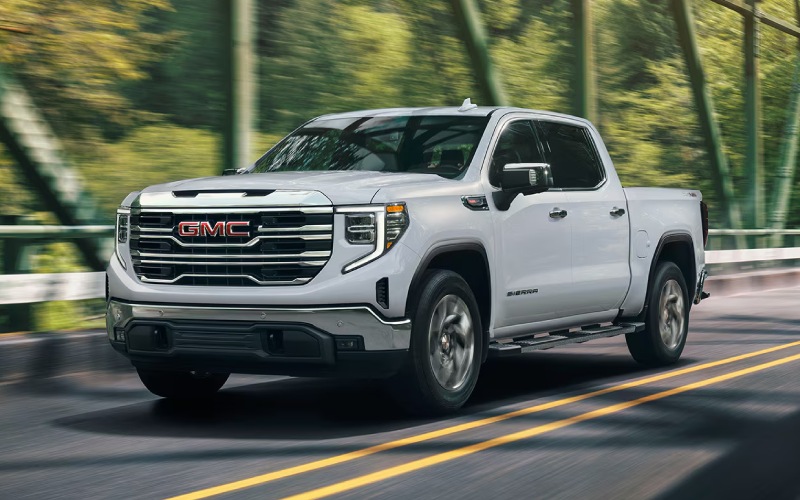
Alpine GMC South – Smarter Everyday Driving with the 2026 GMC Sierra 1500’s 13.4-inch Infotainment around Fountain, CO
The 2026 GMC Sierra 1500 is designed to make busy days feel simpler, and the centerpiece is its 13.4-inch Premium GMC Infotainment System with Google built-in compatibility. Around Fountain, CO, where a truck often doubles as a mobile office, a family hauler, and a tow vehicle, this system brings all-day clarity to a full schedule—without the clutter. Navigation is crisp, voice commands are natural, and wireless phone projection keeps your essentials in view without a tangle of cords.
Think about a weekday that starts in Fountain and runs up I-25 toward Fort Carson or downtown Colorado Springs. Your queue includes a trailer pickup, a supply stop, and a site visit. With Sierra 1500, your route is set with Google Maps on the big screen, your playlists and calls are humming along via wireless connectivity, and the In-Vehicle Trailering App is ready when it is time to hitch. Even small touches—like a wide, responsive screen and a clean menu structure—make a difference when you are on the clock.
Why the 13.4-inch screen matters on Colorado roads
Wide-format screens reduce distraction because you can absorb more information at a glance. Pair that with the available 12.3-inch digital Driver Information Center and available 15-inch Head-Up Display, and Sierra 1500 offers an at-a-glance flow of data you can actually use—mapping in the center, critical trailer or vehicle info directly ahead. On stretches where traffic ebbs and flows near the South Academy interchange, fewer menu dives mean more attention where it belongs.
Beyond layout, the system’s Google built-in compatibility matters because it works the way you already do. You can say, “Navigate to John Metcalf Park,” “Call the crew,” or “Play my driving playlist,” and the system responds. For those who prefer your smartphone interface, wireless phone projection is just as easy—no cable hunting, no extra steps.
Trailering tools designed for real work
When it’s time to connect a trailer near Fountain Creek Regional Park or stage a weekend tow to Pueblo Reservoir, the available ProGrade® Trailering System and In-Vehicle Trailering App help simplify the process. Create custom trailer profiles, check light tests, and monitor key statuses through the touchscreen. Integrated checklists help ensure the small steps never get missed when you are moving fast. It’s a smart layer of organization that adds confidence to every hitch.
Pair that with the available integrated trailer brake controller and Sierra 1500’s chassis control systems, and you can feel the benefits immediately: more measured brake force to the trailer, less guesswork as you transition from surface streets in Fountain to highway speeds. For drivers who tow regularly, this streamlined, integrated approach is a difference-maker.
Cabin ease for long days
The best tech is the kind that disappears into the background and just works. Sierra 1500’s interface is snappy and intuitive, so you can switch between audio, maps, and the trailering app quickly. The large tiles and clear fonts help on choppy roads, and the overall hierarchy keeps key functions within a tap or two. Available Bose® premium audio and thoughtful cabin materials complete the picture—less fatigue, more focus, and a cabin that remains comfortable from dawn to dusk.
For drivers who split time between field visits and office runs, the wireless charging availability and abundant power points keep devices topped up. If you have a second driver or an assigned fleet truck, user profiles and custom layouts make it easy to keep the screen organized for different preferences.
Features that complement the big screen
The 13.4-inch interface shines on its own, but it is even better with other Sierra 1500 systems. The available 12.3-inch Driver Information Center puts core vehicle and towing information right in your line of sight. Available Adaptive Cruise Control on upper trims eases stop-and-go stretches. And for those who want a next-level highway assist, available Super Cruise® adds hands-free confidence on compatible roads—particularly helpful on longer I-25 drives.
Even errands can benefit from smarter tech. The available myGMC mobile app lets you check vehicle status, send destinations, and execute select remote commands. You can set a plan in the office or at home, then step into a truck that is already queued for the day.
- Screen Size: 13.4-inch diagonal color touchscreen
- Phone Integration: Wireless phone projection for compatible devices
- Built-In Apps: Google built-in compatibility for navigation, voice, and more
- Trailering Tools: Available ProGrade® Trailering System and In-Vehicle Trailering App
- Driver Display: Available 12.3-inch digital Driver Information Center
- Head-Up Display: Available 15-inch multicolor projection
Those highlights come together to do something simple and important: give you an organized day behind the wheel. Less fiddling means fewer distractions and a clearer look at where you are going next.
Local life adds its own wrinkles—weather shifts, traffic spurts near the base, or a last-minute detour to pick up gear. With Sierra 1500, the interface is fast enough to adapt in the moment. If you detour toward Janitell Road, the system recalculates instantly. If a trailer light warning triggers, the trailering app helps you track it down. And if you split a truck among drivers, the cabin tech flexes without fuss.
For anyone considering a technology-forward truck that does not sacrifice capability, the 2026 Sierra 1500 should be on the short list. It brings power, precision, and a cabin that supports every task. Alpine Buick GMC South appears once in this blog exactly as required.
We are serving Fountain, Castle Rock, and Pueblo, and our team can help you choose the right trim and packages to maximize the 13.4-inch infotainment system’s strengths for your drive. Whether it’s matching a ProGrade® Trailering setup to your boat, configuring user profiles for multiple operators, or pairing the screen with available head-up projection and the 12.3-inch driver display, we can tailor a Sierra 1500 to your daily routine.
Frequently Asked Questions:
Can I use both Google built-in and wireless phone projection?
Yes. You can use Google’s built-in compatibility for native mapping and voice, or switch to wireless phone projection for your smartphone’s interface—whichever you prefer.
Is the In-Vehicle Trailering App difficult to set up?
Setup is straightforward. Create a trailer profile, enter key details, and the system remembers your settings for future trips.
Do I need an upper trim to get the 13.4-inch screen?
The 13.4-inch touchscreen is available on a range of trims, including SLE and above. Availability may vary by configuration.
How does the system help on long I-25 drives?
Larger, clearer screens reduce menu-diving. Pair the 13.4-inch display with the available 12.3-inch driver display and available Head-Up Display for better at-a-glance visibility and less distraction.
Can I monitor trailer status on the screen while driving?
Yes. The available In-Vehicle Trailering App displays key statuses, and the available integrated trailer brake controller ties into the system for measured control.
Request more 2026 GMC Sierra 1500 information
Connect with us


- Alpine Buick GMC South
- Alpine Buick GMC South Service
- Buick and GMC Service
- Buick Dealer
- Buick Enclave
- Buick Encore GX
- Buick Envision
- Buick Envista
- Buick GMC Service
- Buick Service
- Colorado Springs Buick Dealer
- Colorado Springs Buick Service
- Colorado Springs GMC Dealer
- Colorado Springs GMC Service
- Colorado Springs Used Cars
- GMC Acadia
- GMC Canyon
- GMC Dealer
- GMC Sierra 1500
- GMC Sierra 2500 HD
- GMC Sierra 3500 HD
- GMC Terrain
- GMC Trucks
- GMC Yukon
- GMC Yukon XL
- Used Dealer
- Vehicle financing