



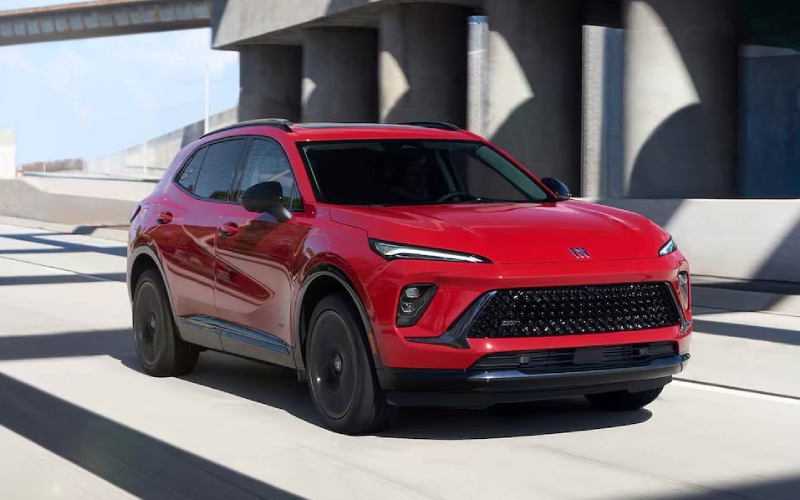
Alpine Buick South – Parking and Visibility Confidence in Colorado Springs, CO — 2026 Buick Envision Tech that Simplifies Tight Spaces
Narrow downtown garages, curbside parking near your favorite patio spot, winding trailhead lots at the end of a scenic drive—these are the places where great visibility tech makes a real difference. The 2026 Buick Envision brings a thoughtful set of standard and available tools, so you can see more, maneuver with less guesswork, and keep daily driving stress to a minimum around Colorado Springs, CO. Let’s walk through how these features work in the real world, what to expect on a test drive, and how to set them up for your exact preferences.
Why visibility and parking tech matter around Colorado Springs
Parking in a busy core near Tejon Street, threading through a tight garage on a weekend, or easing into a space near Garden of the Gods can challenge even the most seasoned local driver. The 2026 Envision builds confidence in these exact moments. Standard Blind Zone Steering Assist can help with lane changes on I-25 and Nevada Avenue, while Rear Cross Traffic Braking is a game-changer when backing out of crowded lots. Add available HD Surround Vision for a birds-eye, stitched view around the vehicle, and the typical parking shuffle starts to feel refreshingly simple.
What sets Envision apart is how that visibility-oriented hardware pairs with its digital experience. The class-leading, ultrawide 30-inch diagonal display gives you generous real estate to see camera views, parking guidelines, and helpful overlays. It’s easier to parse at a glance and helps you make confident decisions at low speeds—especially when you’re weaving around garage ramps or backing near a blind corner.
Feature highlights that make tight maneuvers easier
- HD Surround Vision (available): Delivers high-resolution, top-down, and selectable angle views to show your surroundings clearly as you park.
- Rear Cross Traffic Braking (standard): Monitors vehicles and pedestrians when you’re backing up and can apply braking to help mitigate or avoid collisions.
- Blind Zone Steering Assist (standard): Helps with awareness and can provide steering assistance during lane-change situations.
- Google built-in compatibility: Use voice commands to set a destination or call a business without taking attention from the environment around you.
- Ultrawide 30″ diagonal screen: The largest in its class, making camera views and on-screen guidance more intuitive at a glance.
Together, these features turn tight, low-speed driving into a manageable routine. You see more, react quicker, and rely less on guesswork—all while the Envision keeps the cabin composed with QuietTuning® with Active Noise Cancellation. That calm interior makes it easier to concentrate, especially in crowded garages or busy curbside zones.
How to get the most from the camera system
Spend a few minutes in the driveway customizing your views and settings. On your first drive, try this quick routine to see which angles you prefer near home, work, and your go-to downtown spots.
- Choose your primary angle: Select the view you like most for parallel parking and backing into spaces.
- Practice alignment: Use on-screen guidelines to understand how Envision’s footprint relates to curbs and lines.
- Fine-tune settings: Adjust chimes and volume so alerts are noticeable without being distracting.
- Voice shortcuts: With Google built in, set a voice command routine—“Navigate home” or “Call the coffee shop”—so your hands stay focused on the wheel.
Because the screen is so expansive, you’ll find it easier to tailor what you see and where you see it. If you frequently back into tight spaces, for instance, make that your default camera angle. If your garage has a tricky angle or a narrow entry, try the overhead view for clearer curb-to-fender reference points.
How standard AWD supports everyday maneuvering
While this blog focuses on visibility and parking, standard all-wheel drive with an active twin clutch plays a supporting role in low-speed control—particularly on steep driveways, uneven parking surfaces, and rain-slick entries. The system can proactively shift torque for smooth, composed movement when you’re inching into a space or easing out with limited traction. It’s a subtle benefit you notice most when the pavement is less than perfect.
From commute to weekend errand runs—what to expect on a test drive
Ask to try a loop that includes a parking garage and a tight curbside spot. With an available HD Surround Vision-equipped Envision, watch how quickly you can size up the environment and place the vehicle precisely where you want it. Then, switch over to the standard driver-assist features—feel how the alerts complement your awareness and how calm the cabin remains with QuietTuning® damping outside noise. Finally, use Google’s built-in compatibility to set a destination or make a quick call, noting how voice control keeps your attention on the environment around you.
Frequently Asked Questions:
Is HD Surround Vision standard on the 2026 Buick Envision?
HD Surround Vision is available. It provides high-resolution, stitched camera views that can simplify parallel parking, garage entries, and tight-lot maneuvers.
Which safety features come standard to help with parking?
Rear Cross Traffic Braking and Blind Zone Steering Assist are standard. They support awareness in busy lots and during lane changes, complementing your mirrors and cameras.
Does the 30-inch diagonal display really help with parking?
Yes. The ultrawide 30-inch diagonal screen—the largest in its class—makes camera feeds and parking guidelines easier to see and interpret at a glance, which reduces guesswork in tight spaces.
Can I use voice commands while parking?
With Google built-in compatibility, you can set destinations, call a business, or send a message via voice—helping you stay focused on the surroundings as you finalize a maneuver.
Colorado Springs drivers juggle a little bit of everything—downtown errands, trailhead runs, and tight parking on busy weekends. The 2026 Buick Envision responds with a blend of camera clarity, thoughtful alerts, and the kind of intuitive interface that cuts through clutter. It’s a combination that feels easy on day one and even better as you tailor it to your daily drive.
At Alpine Buick GMC South, we’re happy to set up a test route with real-world stops where these features shine. See how the available HD Surround Vision and standard driver-assist systems simplify crowded lots and narrow spaces—and how the ultrawide 30-inch diagonal display and Google built-in compatibility keep things clear and intuitive. For those comparing multiple trims, ask to demo camera views side-by-side to pinpoint your ideal configuration.
From the first time you ease into a space with confidence to the calm, focused feel of a QuietTuning® cabin, Envision delivers a daily-driving upgrade you notice immediately. It makes complex parking and visibility tasks simpler, and that’s exactly what you want in the heart of Colorado Springs. Alpine Buick GMC South is here to help you dial in the setup that works for your routes—serving Pueblo, Canon City, and Colorado Springs with the tools and support to make every step straightforward.
Request more 2026 Buick Envision information
Connect with us


- Alpine Buick GMC South
- Alpine Buick GMC South Service
- Buick and GMC Service
- Buick Dealer
- Buick Enclave
- Buick Encore GX
- Buick Envision
- Buick Envista
- Buick GMC Service
- Buick Service
- Colorado Springs Buick Dealer
- Colorado Springs Buick Service
- Colorado Springs GMC Dealer
- Colorado Springs GMC Service
- Colorado Springs Used Cars
- GMC Acadia
- GMC Canyon
- GMC Dealer
- GMC Sierra 1500
- GMC Sierra 2500 HD
- GMC Sierra 3500 HD
- GMC Terrain
- GMC Trucks
- GMC Yukon
- GMC Yukon XL
- Used Dealer
- Vehicle financing